Everything You Need to Know about ATAS X
ATAS X is the next-generation version of the ATAS trading analytics platform. Built from the ground up with a new engine and modern architecture, it focuses on improved speed, responsiveness, and cross-platform compatibility.
In this article, we’ll cover what ATAS X is, how to download it, system requirements, and how to get early access.
What Is ATAS X
ATAS X is a redesigned version of the classic ATAS platform. The developers rebuilt the platform using a new architecture designed for faster performance and better responsiveness.
According to the ATAS team:
“ATAS X works significantly faster than the classic version. Program launch and workspace loading are 2.5 times faster. The interface is more responsive than ever—the new version responds to every action instantly, ensuring smooth data handling.”
The platform is designed to combine the functionality traders already rely on with modern technology.
“We’ve reimagined and rebuilt ATAS from the ground up. ATAS X combines the functionality you value with cutting-edge technology. Thanks to its next-generation engine and lightweight architecture, the new version is incredibly fast.”
One of the biggest improvements is true cross-platform support.
“For the first time, ATAS is truly cross-platform. We’ve built a universal foundation so you can enjoy the power of ATAS X on both Windows and macOS.”
This means traders can use the same platform across different devices without changing their workflow.
ATAS X is also designed to evolve continuously.
“ATAS X is a living organism that evolves with your feedback. Updates with new features and fixes are released every week.”
However, because it is still in development, the new version does not yet include every feature from the classic ATAS platform.
“The new version is not a complete replica of classic ATAS. Some familiar modules may be missing, but they may be added soon.”
Where to Download
You can download ATAS X directly from the official website:
Make sure you meet the system requirements and have the correct subscription before installing the beta version.
How to Get Access
Currently, ATAS X is available through early access (Beta).
To access it:
- You must have an active Ultra subscription plan
- Access remains available as long as the subscription is active
Important note: The Ultra free trial does NOT provide access to ATAS X beta testing.
System Requirements
Before installing ATAS X, ensure your system meets the following requirements.
Operating System
- macOS Tahoe or later
- Windows 10 or later
Compatible macOS Devices
- iMac Pro — 2017
- MacBook Pro, MacBook Air, Mac mini — 2018 or newer
- Mac Pro, iMac — 2019 or newer
- Mac Studio — 2022 or newer
Processor
- Apple Silicon: M1 or newer
- Intel Core i5-6600 / i5-7500 / i3-8100 or newer
- AMD Ryzen 5 1600 or newer
RAM
- 8 GB or more
Storage
- 80 GB or more
Graphics
- DirectX 11 and OpenGL 4.0 support
- 4 GB VRAM or more
Internet Connection
- Minimum 30 Mbps
Data Providers
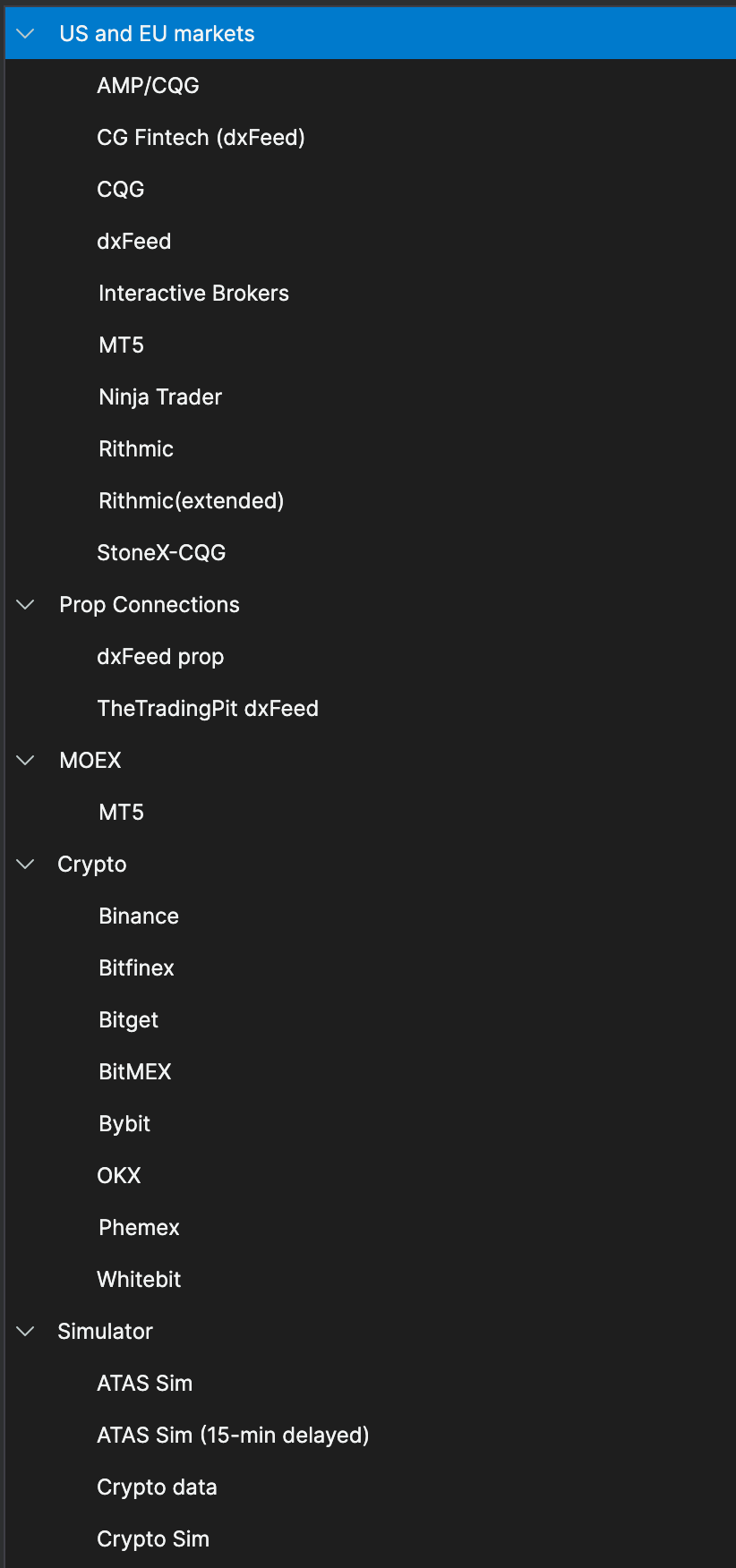
To receive market data, ATAS X must connect to third-party providers.
Cryptocurrency
- Binance
- Bitfinex
- Bitget
- BitMEX
- Bybit
- Kraken
- OKX
- Phemex
- Whitebit
Stocks
- CQG
- CTS
- MT5
- NinjaTrader
- Rithmic
- TAI-PAN
- Trading Technologies
- Quik
- Transaq
Futures
- CQG
- CTS
- dxFeed
- Exante
- Interactive Brokers
- IQFeed
- MT5
- NinjaTrader
- Rithmic
- TAI-PAN
- Trading Technologies
- Quik
- Transaq
How to Install ATAS X
Installing on macOS
- Download the ATASX.dmg installation file
- Open the file
- Drag the application into the Applications folder
- Launch ATAS X from Applications
Installing on Windows
- Download the .exe installation file
- Run the installer
- Choose your installation folder (default:
C:\Program Files (x86)\ATAS Platform) - Complete installation and launch ATAS X
Frequently Asked Questions
Can You Transfer Workspaces From Classic ATAS
No. Workspaces from the classic ATAS platform cannot be transferred directly to ATAS X because the new version uses a different structure.
However, there is a workaround:
You can save each chart’s settings as templates in the classic version and then import those templates into ATAS X.
Can You Use ATAS and ATAS X at the Same Time
Yes. Both platforms can run simultaneously.
The only requirement is that ATAS and ATAS X must be launched from the same IP address.
Will All Classic ATAS Features Be Added to ATAS X
Yes, but gradually.
The development team plans to move the most popular modules first, followed by less commonly used features later.
What Indicator are Available
It comes with 271 total indicators, out of which 37 are order flow related.

How to Report Issues or Send Feedback
If you encounter issues or want to provide feedback while using ATAS X, you have several options.
Telegram Bot
Early access users get access to a Telegram bot where they can report issues, suggest improvements, and share feedback with the developers.
Contact Support
You can also contact support directly from within the platform using the main menu or by emailing:
User feedback is actively used by the developers when preparing updates and improving the platform.
Conclusion
ATAS X represents a major step forward for the ATAS trading platform. With a new engine, faster performance, cross-platform support, and ongoing weekly updates, it aims to deliver a more modern and responsive trading analytics experience.
While the beta version does not yet include every feature from the classic platform, the development roadmap suggests that functionality will continue to expand over time.
If you already use ATAS and have an Ultra subscription, you can start testing ATAS X today.
Join Our Official Discord Server